Table of Contents
- How Teachers Can Build a Professional Digital Profile With One Smart Link
- A Digital Profile Made for Teachers
- Why Teachers Need One Central Place for Their Links
- Make Learning Resources Easier to Share
- Create a More Professional Online Identity
- A Better Experience for Students and Parents
- How to Create a Teacher Profile With Link Bridge
- Keep Your Digital Profile Updated
- Keep the Profile Simple and Useful
- Bringing Classroom and Digital Learning Together
- Conclusion
How Teachers Can Build a Professional Digital Profile With One Smart Link
Teachers today use more digital platforms than ever before. A teacher may share educational videos on YouTube, communicate with students or parents through WhatsApp, post useful learning content on social media, maintain a website, or share study resources online. While these platforms are useful individually, managing and sharing many different links can become difficult. Students and parents may have to search through different platforms to find the right information. A teacher digital profile can make this process much simpler by bringing important links together in one place. With i-Spur Link Bridge, teachers can create a mobile-friendly digital profile where they can organize social profiles, websites, contact details, educational resources, and other important links under one shareable URL.
A Digital Profile Made for Teachers
A teacher's online profile should reflect the work they do. Instead of using a general-purpose design, a teacher can choose an education-focused template that creates a more suitable first impression. In the Link Bridge template collection, the Education category includes a dedicated Teacher section with designs related to classrooms, learning environments, and academic subjects. This gives teachers a starting point that already feels connected to education and teaching.
The advantage of this approach is that teachers do not have to create an online presence completely from scratch. They can select a suitable design, add their own information and links, and create a profile that represents their teaching style and professional identity.
Why Teachers Need One Central Place for Their Links
Imagine a student asking a teacher for a lesson video. Later, another student asks for contact information, while a parent wants to find the teacher's website or additional learning resources. If all these resources are stored on different platforms, the teacher may have to send several different links repeatedly.
A single digital profile can make this easier. Instead of sharing separate links every time, the teacher can share one Link Bridge URL. Students or parents can open the profile and select the information they need.
A teacher's profile could include:
- YouTube lessons and educational playlists
- WhatsApp or contact information
- Personal or school website
- Online learning resources
- Professional social media profiles
- Course or class information
- Educational projects and achievements
- Important announcements
- Professional portfolio information
The purpose is not to add every possible link. The purpose is to organize the most useful information so visitors can find it quickly.
Make Learning Resources Easier to Share
Teachers regularly share learning materials with students. Sometimes it may be a video, sometimes a website, and sometimes information about a particular class or course. When these resources are scattered across multiple platforms, communication can become repetitive.
With a centralized teacher profile, the teacher can provide one link that acts as a starting point for all important resources. A student can open the profile and choose the lesson, website, contact option, or other destination they need.
This is especially useful when resources change regularly. A teacher may publish a new educational video, add a new learning resource, update a website, or introduce a new course. Instead of creating a completely new link for every change, the teacher can keep the main profile link the same while updating the information inside it.
Create a More Professional Online Identity
A teacher's digital presence can also communicate their professional identity. When students, parents, or other educators visit the profile, they should be able to understand what the teacher teaches and where they can find useful information.
For teachers who regularly create educational content, a digital profile can work as a central starting point. A YouTube channel may contain many videos, while social media may contain years of posts. A dedicated profile allows the teacher to highlight the information that matters most.
Teachers can use their profile to showcase:
- Their main subject or teaching area
- Educational videos
- Learning resources
- Professional information
- Contact details
- Relevant social media
- Websites and educational platforms
- Current teaching projects
Even a simple profile can be effective when it presents information clearly instead of overwhelming visitors with too many options.
A Better Experience for Students and Parents
A teacher's audience can include students, parents, colleagues, and people discovering their educational content online. Each person may be looking for something different.
A parent might want to learn more about the teacher or find a communication option. A student might want to watch a lesson or access a learning resource. Another educator might want to view the teacher's professional information.
A centralized digital profile gives each visitor one clear place to start. Instead of searching across several platforms, they can open one profile and choose the relevant option.
This can make digital communication more organized without changing the way teachers already use their preferred platforms.
How to Create a Teacher Profile With Link Bridge
Creating a useful teacher profile does not need to become a complicated technical project. Link Bridge is positioned as a no-code digital profile and link-in-bio builder, allowing users to choose a template, add their information and links, customize their profile, and share it through one URL.
The process can be kept simple:
- Choose a Teacher template from the Education category.
- Add your important links such as educational videos, website, contact details, and social profiles.
- Customize the profile to match your professional style.
- Publish and share one link with students, parents, colleagues, or your online audience.
Because the profile is designed for mobile use, students and parents can access it directly from their phones.
Keep Your Digital Profile Updated
A teacher's digital presence can grow over time. A teacher may start with a YouTube channel and contact information and later add a website, online resources, professional projects, or other platforms.
This means a teacher digital profile does not have to be treated as a one-time setup. It can grow alongside the teacher's online work. New resources can be added as they become important, while older or less useful links can be removed.
The result is a digital profile that stays relevant instead of becoming a static collection of outdated links.
Keep the Profile Simple and Useful
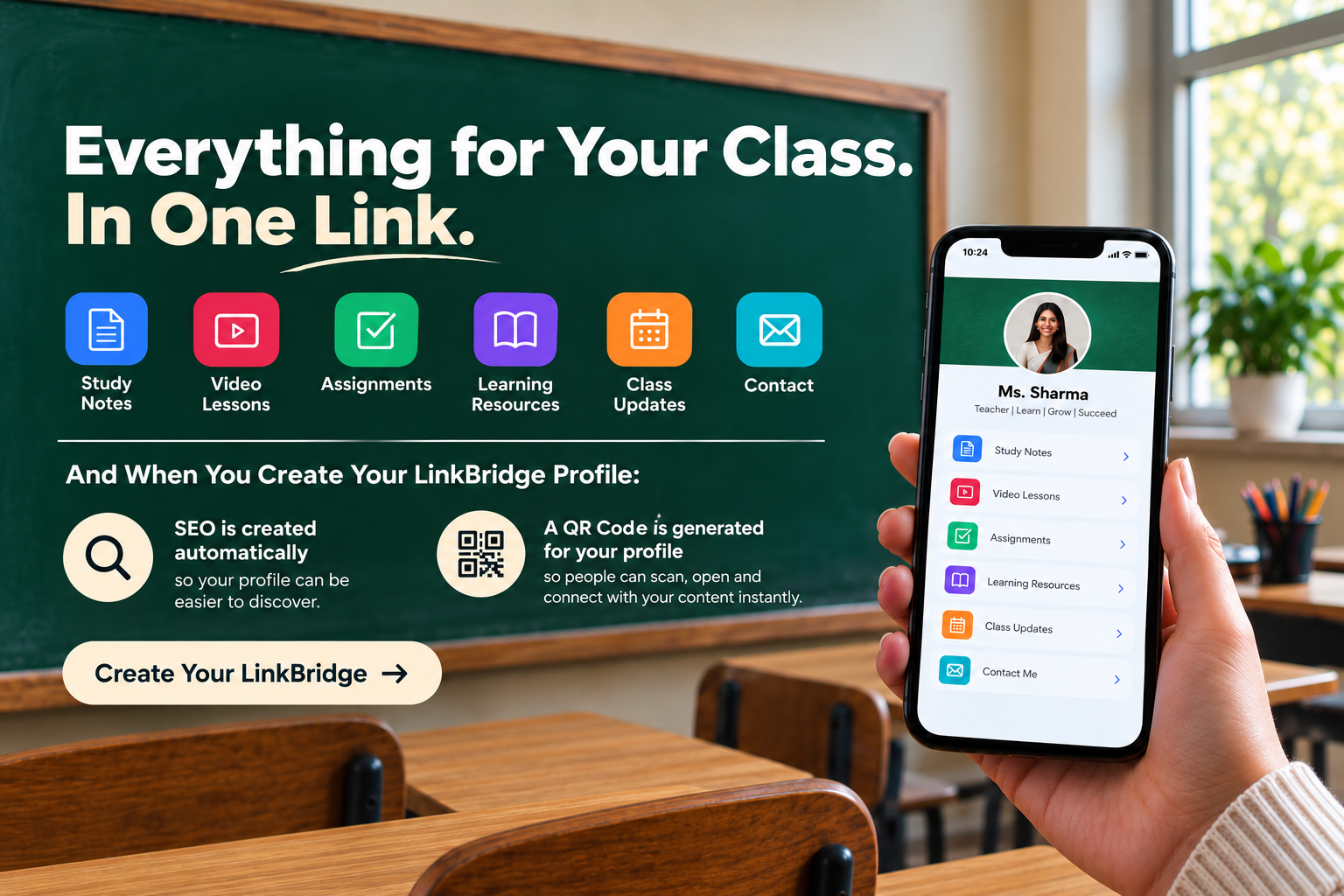
Having one page for multiple links does not mean the page should contain everything. A good teacher profile should be easy to understand at a glance. Students and parents should quickly recognize who the teacher is and know where to click next.A simple structure could include:
Teacher Name
Subject or Teaching Area
Short professional introduction
Main Links
- Latest Educational Videos
- Learning Resources
- WhatsApp / Contact
- Website
- Professional Profile
- Social Media
- Featured Course or Class
The exact information can change according to the teacher's needs. What matters most is keeping the profile clear and useful for the people who visit it.
Bringing Classroom and Digital Learning Together
Teaching increasingly extends beyond the physical classroom. Educational videos, online resources, digital communities, and social platforms can give teachers additional ways to share knowledge and stay connected with their audience.
A teacher's digital profile can act as a bridge between these different spaces. Instead of replacing YouTube, WhatsApp, social media, or a website, it connects them through one simple destination.
For teachers who create online educational content, this can be particularly useful because people may discover them through different channels. Someone may find a lesson video, receive a profile through WhatsApp, or discover the teacher through social media. One central profile gives each visitor a clear next step.
Conclusion
A professional digital presence does not need to be complicated. For teachers, the main goal is to make useful information easier to find and easier to share. A teacher digital profile can bring educational videos, learning resources, social media, contact information, websites, and professional details together in one organized place.
The Teacher template in i-Spur Link Bridge gives educators an education-focused starting point for creating this type of profile. Rather than sharing several different links, teachers can create one mobile-friendly destination and use that single link across their digital communication channels.
For an educator, one smart link can become a simple digital front door to their teaching resources, professional identity, and online content. As teachers continue to combine classroom teaching with digital communication, having one organized place for their important links can make the experience easier for both educators and the people they teach.